
Step 1: Logging In
To access your dashboard and view campaign reports:
-
Login Credentials :
- Enter your username and password on the login page.
- If you don’t have login credentials, please contact your account manager for assistance.
-
Accessing the Dashboard :
- Once logged in, you’ll be redirected to the dashboard , where all your campaigns are listed.

Step 2: Accessing Campaign Reports
After logging in, follow these steps to view your campaign reports:
Locate the Campaign
- On the dashboard , you’ll see a list of all your campaigns.
- Each campaign has an eye icon located on the right side of the campaign row.
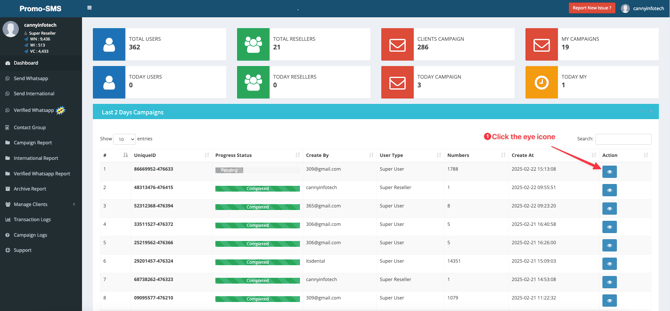
View Reports
- Click the eye icon next to the campaign you want to review.
- This will take you to the Campaign Reports Page , where you can view detailed insights about the campaign’s performance.
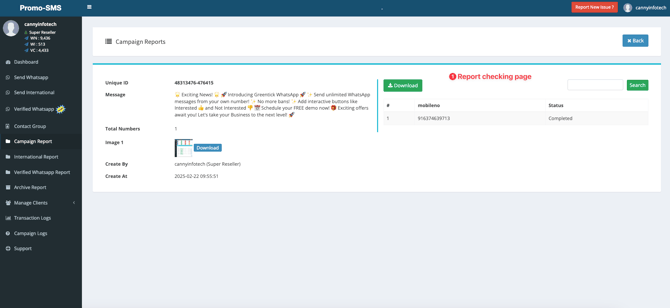
Step 4: Downloading Reports
If you’d like to save or analyze the reports offline:
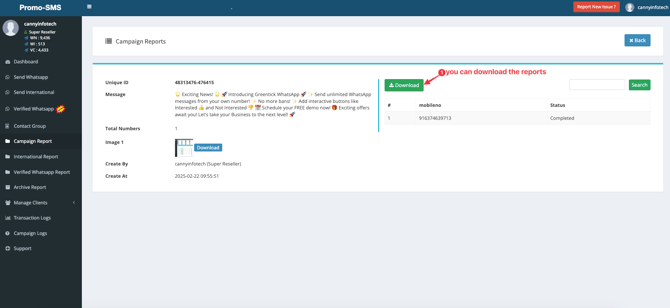
- Look for the Download Button on the Campaign Reports Page.
- Click the button to download the report in a compatible format (e.g., CSV, PDF, or Excel).
- Save the file to your preferred location on your device.
Additional Notes
- Real-Time Updates : Reports are updated in real-time as the campaign progresses.
- Data Retention : Ensure you download reports promptly, as data may only be available for a limited time.
- Support : If you encounter any issues while accessing or downloading reports, reach out to your account manager or support team for assistance.